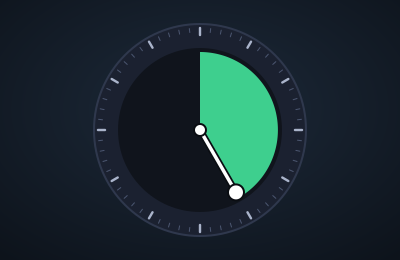
Color Timer
Goal
A timer you can see. It is a clock face with a coloured wedge that shows how much time is left and shrinks as the minutes go, so one glance tells you how long you have without reading any numbers. It is for work sprints, cooking, breaks and anything else with a time limit.
How it works
- Tap the dial, or drag the minute hand, to any minute on the 60-minute circle. The colour fills from 12 o'clock round to the hand. Press Start.
- Or type a duration in the first box (25, 1h30, 90s or 5:00) or a clock time in the second (3:45pm, 15:45 or noon) and press Enter. A line under each box says what it understood, and a time that has already passed today means tomorrow.
- The hand sweeps back to 12 as time runs out, and the colour shifts from green through yellow to red. Choose one fixed colour instead if you prefer.
- You can drag the hand while it runs to give yourself more or less time. A tap on the rest of the dial is ignored while it runs, so a stray touch cannot change it.
- Over an hour? The dial stays full until the last hour, and the big number shows the real time left.
- When time is up the dial rim glows, the big number reads 0:00 and it says "Time's up". The minute hand then carries on past 12, sweeping back round, and the space it passes is shaded pink with a quiet "+1:23 past the end" counting the time since, so you can tell at a glance it is not still counting down. Choose how the shading looks (pulsing stripes, soft solid, pulsing or blinking) under Look.
- The alarm plays one of five sounds (soft beeps, bell, marimba, rising notes or a digital alarm) once, four times or until you press Stop the sound, which keeps the time since on screen. You can also turn on rings across the dial, soft colour flashes, vibration, a flashing browser tab title and a notification while the page is hidden. Try the alarm shows them without starting a timer.
- Full screen shows nothing but the dial, the time and the buttons (press F, or use the button; Escape leaves it). Under Look you can have everything except the timer dim after 5 seconds to 2 minutes without a touch, mouse move or key press; it lights up again the moment anything happens, or when the alarm goes off.
- The time left also shows in the browser tab, and the screen stays awake while it runs where the browser allows.
- With the keyboard: Space starts and pauses, and with the hand focused the arrow keys move it by a minute, Page Up and Page Down by five, Home to empty and End to full.
Saving and privacy
Your last time, a timer that is running (or how long ago one ended) and your look, sound and effect settings save automatically in this browser only, and nothing is sent anywhere. A running timer keeps going across a reload because it remembers when it ends. Clearing site data, or switching browsers or devices, loses it, so use Backup and restore at the bottom of the page for a copy.
Current state
Work in progress. Version 0.2 does everything above. Next: install it as an app and make it work offline.
Changelog
- v0.2 — the hand carries on past 12 when time is up with shaded time-since, full-screen view, dim-when-idle, five alarm sounds with repeat and a stop button, more end effects, narrower side margins.
- v0.1 — first version: the dial, drag and tap to set, typed durations and target times, start, pause and reset, shifting or fixed colour, chime, backup and restore.