Simple Count Down
Goal
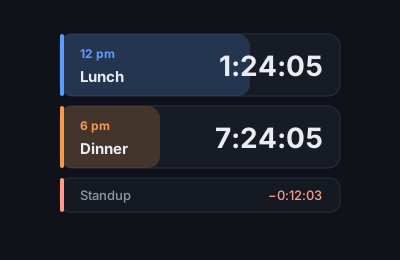
A stack of countdowns to the times that matter today, for leaving on a second screen or a spare phone. Each timer shows its clock time, a name, the countdown, and how long it has been since your day started, with a subtle progress bar filling as the day goes on.
How it works
- Day start. Set your usual start (like your morning wake time) in Settings. Every timer shows the time since it. A timer's target is the next time its clock time comes up after the start, so a 12 am timer on an 11 am day is the midnight at the end of that day. The day rolls over at the start time.
- Passed timers go negative. Once a target passes, the countdown keeps going as negative time ("time since"). The timer keeps its place in the list until the day rolls over, so nothing jumps around.
- Today's override. The top bar has a small day-start field. Change it, or press Now, to override the start for today only. It clears itself at the next default start.
- Minimize. The chevron on a timer shrinks it to a slim bar with just the title and a small value, in the same position.
- Add, edit, remove. Add opens a small form: name, time, repeat (every day, or once on a date), color. Double-click a timer or use its pencil to edit or remove it.
- Views. Stack, Columns, Grid, List and Focus (the next timer big, the rest small). The stack has a maximum height and resizes the timers to fit as you add and remove them.
- Second screen mode. Full screen, keep the screen awake, and fade the top bar when idle are in the top bar and Settings.
Saving
Everything saves in this browser (localStorage). Settings → Download backup saves a JSON file you can restore on another browser or device.
Current state
Beta. Works offline once loaded but is not yet an installable offline app.
Changelog
- v0.1 — first version: timers, day start with a temporary override, five views, settings page, backup and restore.