Telltale
Goal
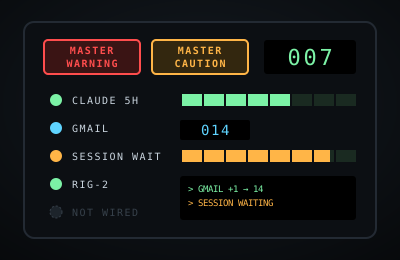
A cockpit-style status panel that shows, at a glance, everything that is waiting, running low or burning too fast: AI plan limits and pace, unread mail and messages, what is running on a second computer, tasks inside my own AI apps, and usage against plan limits across my tech stack.
How it works
- Each bay groups related readings: AI capacity, comms, second computer, AI sessions, my AI apps, stack limits.
- Lamps glow green when all is well, cyan when something is there, amber when getting close to a limit or when a session needs input, and red past the limit.
- Master Warning and Master Caution light up when any lamp is red or amber. Click one to acknowledge it and stop the flashing.
- Limit gauges show their pace: whether usage is on track to run out before the limit resets.
- Small badges say how much to trust each number: exact, estimate, simulated, or not wired yet.
- The Wiring view lists how each reading will be connected.
Saving and privacy
This is a prototype: every reading is simulated and nothing is connected to any account. The only thing saved is your panel settings (feed on or off, blinking, which view), in this browser. Use Setup to back them up or reset them.
Current state
Prototype with a simulated feed. Real connections come later, in a private version.
Changelog
- v0.3 (2026-11-11): stack gauges for GitHub, Vercel, Neon, Supabase, cron-job.org and SiteGround; Groq split into chat, speech-to-text and text-to-speech.
- v0.2 (2026-11-11): pace on limit gauges (OVER PACE turns amber before the limit), OpenRouter and Groq gauges, an agents and scripts list, signals reordered.
- v0.1 (2026-11-11): first prototype: six bays, 22 slots, simulated feed, master caution and warning, wiring view, event log.